
Can AI do my accounts?

Written by Sarah Hedley MAAT. Reviewed by a MAAT-qualified accountant. Last reviewed: 17 November 2026.
Can AI do my accounts? Short answer: not on its own, not yet. AI can support you in preparing your accounts. It can match bank lines, read receipts and suggest where costs should go. But what comes out is only as good as what goes in, and it can’t take responsibility for your tax.
Whoever does the work, HMRC is clear on one point. Even if you authorise an accountant to deal with your tax, you’re still legally responsible for your own tax. The same applies to software. If AI gets something wrong, the return is still yours.
This article sets out what AI can do now, what it can’t, and the questions to ask before you rely on it.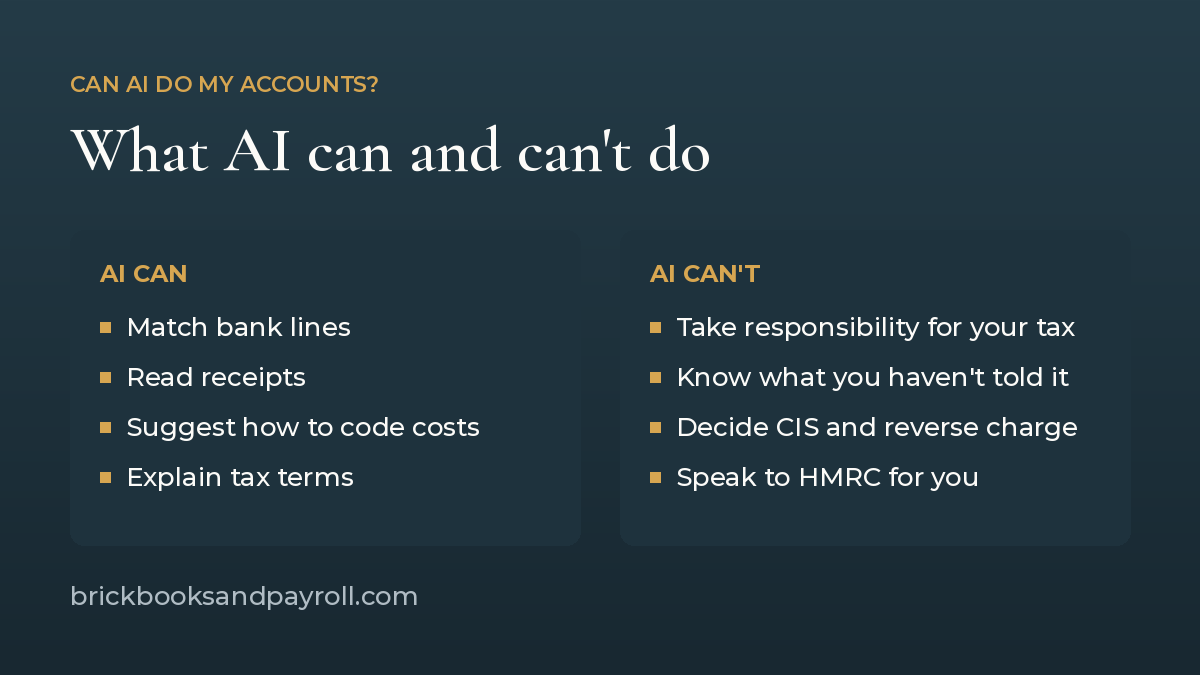
What AI can already do in accounting software
- Match your bank transactions. Xero’s AI feature, called JAX, can reconcile bank lines automatically when it’s highly confident of a match, and leaves the rest for you to review. Xero: automatic bank reconciliation
- Read receipts and bills. Receipt capture apps read the supplier, date, amount and VAT from a photo, so you don’t need to type it in or keep the paper copy.
- Suggest how to code costs. Software learns from how transactions were coded before and suggests the same again.
- Answer general questions. AI chat tools can explain terms like payments on account or the flat rate scheme in plain English.
All of this is bookkeeping: getting the numbers into the system. It saves time, but somebody still has to check it.
What AI can’t do for you
- Take responsibility. The legal responsibility stays with you, whatever software or adviser you use.
- Know what it hasn’t been told. AI only sees what’s in the system. Cash jobs, a second income, or a van bought on a personal card won’t appear unless someone puts them in. An undisclosed income stream can undo a whole year of bookkeeping and tax work.
- Make construction judgement calls. Whether a subcontractor is verified for CIS (the Construction Industry Scheme), what rate to deduct, how labour and materials are split on an invoice, and whether the domestic reverse charge applies all depend on facts about the job and the people involved. Software can apply a rule once it’s set up. It can’t tell you whether the rule was the right one.
- Know your life and your plans. Getting married, a second job, selling a property, taking on your first employee, buying the new van this year or next: all of these change your tax. AI doesn’t know any of it unless you tell it. Sole trader or limited company, salary or dividends: the right answer depends on where you want the business to go.
- Keep up with changing rules. AI tools are built from information gathered up to a point in time. Unless someone points out that a rate, threshold or rule has changed, the tool may not know.
- Deal with HMRC for you. Only someone you’ve authorised can speak to HMRC on your behalf. Appoint someone to deal with HMRC
Common errors software doesn’t catch on its own
When a trades or construction business moves to a new accountant, the same problems come up again and again. Each one can sit inside software that looks tidy:
- CIS mixed into PAYE. CIS and PAYE aren’t separated each month. HMRC can move allocations around inside a PAYE account, so without a monthly check it quickly becomes hard to untangle.
- Reverse charge errors on invoices. VAT charged wrongly on sales invoices, or VAT and CIS shown wrongly on invoices from subcontractors, with nobody asking for a corrected invoice.
- Subcontractors not verified. So no CIS deductions are made at all.
- Government Gateway not set up properly. Taxes aren’t linked to the account, so getting access in good time is a struggle.
AI can post a transaction perfectly and still post it under the wrong rule. These errors are about the rule, not the typing.
Using ChatGPT and other AI chat tools for tax questions
Many people now ask ChatGPT or similar tools quick tax questions. If you do, keep these points in mind.
- Rates change every tax year. An answer can be right for last year and wrong for this one. Check any rate, threshold or deadline on gov.uk.
- It doesn’t know your figures. A general answer may not fit your circumstances.
- It can sound sure and still be wrong. AI tools can give a confident answer that turns out to be wrong, and may only change it once you challenge it. That only helps if you know enough to spot the mistake.
- It can pick up information from anywhere. Answers may come from forums, out-of-date articles or another country’s tax rules, mixed in with reliable sources. Right and wrong information can look the same.
- Think about what you upload. Bank statements, payslips and invoices contain personal details about you, your staff and your customers. Check where that data goes before you paste it in.
- Ask for the source. If the tool can’t point to a gov.uk page, treat the answer as unconfirmed.
Can ChatGPT do my tax return if I’m a CIS subcontractor?
The questions subcontractors most often type in are things like “how much CIS refund will I get?”, “what expenses can I claim?” and “how much should I put aside?”. ChatGPT can explain how these work in general. It can’t answer them for you, because the answers depend on records it can’t see.
- It can’t see your HMRC records. Your contractors report the deductions they take to HMRC every month. When you claim CIS deductions on your Self Assessment return, HMRC compares them with what your contractors reported. ChatGPT only knows the figures you type in.
- It needs every statement. To claim your deductions back, you need the monthly payment and deduction statements your contractors give you. Miss one and any refund figure it gives you is wrong.
- It can’t send your return. Your return still goes to HMRC in your name, sent by you or your agent.
- Never give it your sign-in details. HMRC says you must not give your sign-in credentials to your agent or anyone else. That includes pasting your Government Gateway details into a chat tool.
- An estimate is only an estimate. If one expense is wrong or one statement is missing, the refund figure is wrong, however sure it sounds.
It can help you understand the terms and get your questions ready. It can’t check your figures against HMRC’s.
Making Tax Digital and AI
Making Tax Digital (MTD) for Income Tax means keeping digital records and sending HMRC quarterly updates using compatible software. You need to use it from 6 April 2026 if your income from self-employment and property is over £50,000. It applies to income over £30,000 from April 2027 and over £20,000 from April 2028. This is based on turnover before expenses, not profit.
AI features inside MTD software can help keep those records up to date through the year. The quarterly updates and the final return still go to HMRC in your name, sent by you or your agent.
You still need to know what right looks like
To check whether AI has done your accounts correctly, someone needs to know how a set of accounts is put together. For example: does the VAT on the return agree to the VAT in the books? Does the CIS deducted agree to your payment and deduction statements? Has a big purchase been treated as an asset rather than an everyday cost? Without that knowledge, a wrong figure looks exactly like a right one.
Research points the same way. An article on The Conversation (November 2026) reports that a person working with AI tends to get a better result than AI alone, but that getting useful results takes judgement. In a 2026 pilot study it describes, health-care professionals accepted half of the AI recommendations that had been made deliberately wrong. In another study of how the UK public uses AI for medical advice, people sometimes left out important details, and the chatbots then mixed useful suggestions with misleading ones. The same applies to your accounts: leave something out, or miss a wrong answer, and the result is wrong.
Put the right information in, check what comes out, and point out anything it couldn’t know: changes in your life, your plans, and changes in the rules.
A simple test for anything AI posts
Ask one question of every entry: if HMRC picked your business for a compliance check, would this hold up? Is there a receipt, and is there a clear reason the cost belongs to the business? If there’s no argument for it, it shouldn’t go through, however confident the software was.
Can AI do my accounts? At a glance
| Job | Can AI do it? | What still needs a person |
| Matching bank lines to invoices and bills | Partly | Checking the lines it flags, and spotting ones it matched wrongly |
| Reading receipts and bills | Yes, mostly | Making sure the receipt is a business cost and coded to the right place |
| Checking a subcontractor is verified for CIS | No | Verifying through HMRC and recording the deduction rate |
| Deciding if the domestic reverse charge applies | No | Knowing who the customer is and what the work is |
| Answering general tax questions | Partly | Checking the answer against gov.uk for the right tax year |
| Choosing sole trader or limited company | No | Your plans, your figures and advice on your circumstances |
| Knowing your plans and life changes | No | You telling it, every time something changes |
| Checking the accounts are right | No | Someone who knows how a set of accounts is put together |
| Being legally responsible for your tax | No | You, always |
| Paying the penalty if it’s wrong | No | You, plus the tax that was underpaid |
What does AI cost?
AI in accounting isn’t free. The costs come in five forms.
- The software. AI features sit inside paid accounting software. From 1 September 2026, Xero’s UK plans are £18 (Ignite), £39 (Grow), £55 (Comprehensive) and £70 (Ultimate) a month, excluding VAT. Not every AI feature comes with every plan, and extras such as payroll cost more per person.
- ChatGPT has a free version, but uploads such as bank statements and receipts are limited on it. OpenAI lists ChatGPT Plus at $20 a month and Pro at $200 a month (US prices), with business plans charged per user. The UK price shows in pounds when you sign up. This is on top of your accounting software, not instead of it: ChatGPT doesn’t keep your records or send anything to HMRC.
- Your time. Someone has to check what AI has matched and coded, fix what it got wrong, and tell it about changes it can’t know. Time spent on the books is time not spent on site earning.
- Getting it wrong. If an inaccuracy leads to tax being underpaid, HMRC can charge a penalty on top of the tax. For a careless inaccuracy, the penalty is 0% to 30% of the extra tax if you tell HMRC before they find it, and 15% to 30% if they find it first. HMRC won’t charge a penalty if you took reasonable care, which includes keeping accurate records and checking with a tax adviser or HMRC if you’re not sure.
- Putting it right. If the books need unpicking later, someone has to go back through each entry and check the evidence. That usually takes longer than getting it right first time.
There’s also the cost of what AI doesn’t spot. It won’t tell you that a change of structure, a VAT registration or the timing of a big purchase could change your tax, unless you already know to ask.
What happens if something goes wrong?
HMRC can carry out a compliance check on any taxes you pay, your accounts and tax calculations, your Self Assessment or Company Tax Return, and your PAYE records. During a check, HMRC may ask for documents, ask to meet you to discuss your tax affairs and records, or ask to visit your business premises. General information about checks
You have the right to be represented and can appoint anyone to act for you. If you use an accountant, HMRC contacts them instead, and you can have an accountant or legal adviser with you during a visit. An AI tool can’t be appointed, can’t speak to HMRC and can’t sit in a meeting with you.
If you find a mistake, you can correct a Self Assessment return within 12 months of the filing deadline. For the 2024 to 2025 tax year, that usually means by 31 January 2027. After that, or for an earlier year, you need to write to HMRC.
Questions worth answering before you rely on AI alone:
- How would you know your accounts are right without someone qualified to look over them?
- If you were picked for a compliance check, would you know what HMRC needs and how to respond?
- Have you got the time to gather documents and attend meetings?
- If something is wrong, do you know how to correct it and who to speak to?
So, can AI do my accounts? In our view, not yet.
In our view, no, AI can’t do your accounts. Not yet, anyway. It can most certainly support you in preparing them, but you have to put the right information in to get the right information out.
AI doesn’t know your life circumstances. It doesn’t know your future plans. It doesn’t necessarily know if legislation has changed. All of these need pointing out to it, and even then it gets things wrong.
When we tested it, a high number of the results came back incorrect. When it’s corrected, it replies along the lines of “yes, you’re right, I was wrong to say…”. That only helps if you already know the right answer.
You also have to be careful where it gets its information. It could come from anywhere on the internet, whether that information is right or wrong.
Checking AI’s work isn’t a quick glance either. For a professional to check your accounts properly, they’d need to almost do them again: follow what’s been done and check the evidence behind each figure.
And when a problem comes up, such as a letter from HMRC, a penalty, or a cash flow gap before a big job, most people want to talk it through with a person who knows their business. AI can’t sit across a Teams call from you and talk it through.
We love AI and use it, but we choose humans. Like any revolutionary period, the profession will need to adapt, and AI will change how accounts are prepared. It doesn’t remove the need for someone who knows what they’re looking at.
AI is fantastic at some things. But you still need to know how to do a set of accounts to tell whether AI has done them correctly. It’s just not that simple yet.
Can AI do my accounts? Ask yourself these first
- Who checks what the software has matched or coded, and how often?
- Is everything going in, including cash and any income outside the business account?
- Are my subcontractors verified, and is CIS being deducted at the right rate?
- Do my invoices show the reverse charge correctly where it applies?
- Does my software work with Making Tax Digital, and when do I need to start?
- Who deals with HMRC if a letter arrives?
Sources
- UK: Authorising an agent to deal with your tax affairs
- UK: Appoint someone to deal with HMRC on your behalf
- UK: Sign up for Making Tax Digital for Income Tax
- UK: Digital record-keeping direction for MTD for Income Tax
- The Conversation: AI is set to change the graduate job market (Nov 2026)
- Xero: UK pricing update from 1 September 2026
- UK: Penalties for inaccuracies (CC/FS7a)
- Xero: Automatic bank reconciliation with JAX
This article is general information. Outcomes depend on your individual circumstances, so speak to your accountant before acting.
Brickbooks and Payroll Ltd, company number 14528647. Licensed and regulated by the AAT. Registered Authorised Corporate Service Provider (ACSP) with Companies House.